Ink
Ink


 Machines


 Cartridges


 Studio supplies


 Power & batteries


 Aftercare


 Traditional tattooing


 Apprentice


 Piercing & jewellery


 PMU supplies


 New arrivals
 Sale
Sale
 Gift vouchers
 Shop all


 March 11, 2026
-
4 months ago
March 11, 2026
-
4 months ago
Your tattoo machine is the most important piece of equipment you own. Every session subjects it to constant vibration and exposure to ink, skin debris, and moisture. If you want it to perform at its best session after session, you need to maintain your tattoo machine properly, not just when something goes wrong. Consistently, from day one.
This guide is written for working tattoo artists and studio owners in the UK. It covers daily cleaning habits, weekly mechanical checks, lubrication, part replacement, troubleshooting, and storage. Whether you run a Dragonhawk wireless pen, a Bishop Power Wand, or a coil machine, the principles are the same. Keep it clean, keep it tuned, and know the warning signs before they cost you a session.
Why You Need to Maintain Your Tattoo Machine Consistently
A well-maintained machine performs predictably. Lines stay sharp, ink flows evenly, and the motor runs quietly. When maintenance slips, your clients feel it before you do.
Neglect leads to corrosion at contact points, clogged cartridge ports, premature motor wear, and inconsistent needle drive. Many of the most common machine failures are entirely preventable with a basic routine. The cost of a regular cleaning habit is minutes per session. The cost of ignoring it is a machine that lets you down midway through the appointment.
When you properly maintain your tattoo machine, you protect your investment, extend its working life, and keep your output consistent.
How Often Should You Maintain Your Tattoo Machine?
It depends on how much you work and what kind of machine you use.
For artists working four to five days a week, a deep service every three to four weeks is the minimum. Part-time artists can generally manage with a monthly full inspection. Convention work and high-humidity environments increase how often you need to clean and check components.
Regardless of how often you tattoo, the post-session wipe-down is non-negotiable every single time.
Here is a structured schedule to help you maintain your tattoo machine at the right intervals:
|
Task |
Daily |
Weekly |
Monthly |
|---|---|---|---|
|
Wipe down the exterior |
Yes |
||
|
Clean grip and cartridge port |
Yes |
||
|
Check for visible damage or wear. |
Yes |
||
|
Inspect springs and drive bar. |
Yes |
||
|
Lubricate moving parts |
Yes |
||
|
Replace worn rubber bands or grommets. |
As needed |
||
|
Full strip and inspect all components |
Yes |
||
|
Check contact screw alignment (coil machines) |
Yes |
||
|
Restock spare parts |
Yes |
This tattoo machine maintenance schedule works for rotary, pen, and coil setups alike. Adapt the frequency to your workload.
How to Maintain Your Tattoo Machine After Every Session
Post-session cleaning is the foundation of proper tattoo machine maintenance. Every session leaves behind ink, blood, skin cells, and lubricant residue. Left to build up, this degrades performance and creates hygiene risks.
After removing and disposing of the cartridge:
-
Wipe the machine body and grip using a medical-grade surface disinfectant.
-
Use a cotton swab to clean inside the cartridge port. Check for ink buildup around the rubber seal.
-
Inspect the exterior of the machine for any cracks, loose parts, or corrosion.
-
Check the grip connection and reassemble before storing.
Using a barrier sleeve during sessions significantly reduces post-session cleaning time and protects the machine body from contamination.
How to Maintain Your Tattoo Machine: Rotary and Pen Models
Pen and rotary machines have fewer exposed mechanical parts, which makes them easier to clean. However, this does not mean they need less attention.
Step-by-Step Rotary Machine Maintenance
-
After the session, remove the cartridge and dispose of it correctly.
-
Wipe the machine body and grip with a medical-grade surface disinfectant.
-
Clean the inside of the cartridge port with a cotton swab. Ink buildup here directly affects needle drive consistency.
-
Inspect the drive bar for debris or corrosion. Wipe it clean and apply a small amount of machine-specific lubricant.
-
Check the grip connection and any rubber seals. Replace if worn.
-
Reassemble and test at low power before your next session.
Machines in the AVA EP series, AVA Uni-B, Dragonhawk Fold Pro, and Mast Fold 2 Pro range all benefit from this routine. If you run a wireless machine, also check the battery contacts for corrosion and clean with a dry cotton swab.
Product Spotlight:
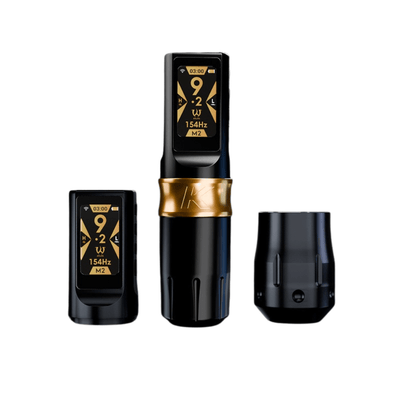
AVA Uni-K Wireless Tattoo Pen Machine: A high-performance wireless pen machine designed for reduced maintenance demands and consistent output. Available at Magnum Tattoo Supplies.
Product Spotlight:
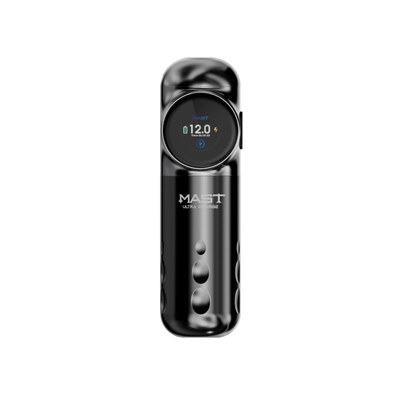
Dragonhawk Mast Archer S Wireless Tattoo Pen Machine: Reliable, lightweight wireless pen machine built for consistent performance across long sessions. Available at Magnum Tattoo Supplies.
How to Maintain Your Tattoo Machine: Coil Machines
Coil machines have more exposed components and require more thorough attention than pen or rotary setups. Springs, contact points, and the needle bar all need regular checking.
Step-by-Step Coil Machine Maintenance
-
Remove the needle bar and dispose of the needle safely in a sharps container.
-
Wipe down the entire frame using a surface disinfectant.
-
Check the front and back springs for ink deposits. Clean carefully with a cotton swab.
-
Inspect the contact screw and binding post for corrosion or ink residue.
-
Check the armature bar and yoke for any debris or loose fittings.
-
Reassemble and test for smooth, consistent operation at low voltage before the next session.
If you run a coil machine like the Padiy Irons CNC Brass Liner or the Victor Portugal Liner available at Magnum, build this into your end-of-day routine without exception.
Lubrication: How to Maintain Your Tattoo Machine from the Inside
Lubrication is one of the most overlooked aspects of properly maintaining your tattoo machine. Under-lubrication causes friction and early wear. Over-lubrication attracts debris and leads to contamination inside the cartridge port.
How to Lubricate a Pen or Rotary Machine
Apply a small amount of machine-specific lubricant to the drive bar and motor shaft only. Avoid the grip area and the cartridge port entirely. A tiny amount is sufficient. Too much lubricant causes more problems than it solves.
How to Lubricate a Coil Machine
For coil setups, apply lubricant to the needle bar pivot point and the armature bar contact area. Do not apply it to the springs or contact screw.
Parts Replacement: What Wears Out and When
Knowing which parts to replace and how often is central to maintaining a tattoo machine at a professional standard.
Coil Machine Parts
Rubber bands and grommets wear out quickly on coil setups. If you work daily, replace them every week. Stretched or perished bands directly affect needle tension and line quality.
Springs are another common wear item. Inspect them at every weekly check and replace them at the first sign of fatigue, cracking, or deformation.
Rotary and Pen Machine Parts
For rotary and pen machines, focus on drive bars and O-rings. Drive bars take the most mechanical stress and should be checked regularly. The cartridge port rubber seal degrades with heavy use and repeated exposure to disinfectants.
Troubleshooting: How to Maintain Your Tattoo Machine When Problems Arise
Even when you maintain your tattoo machine consistently, issues can appear. Knowing the warning signs helps you fix problems before they affect a client's appointment.
|
Problem |
Likely Cause |
Fix |
|---|---|---|
|
The machine is running roughly or is noisy |
Worn spring or dry drive bar |
Lubricate the drive bar, and check the spring condition |
|
Losing power mid-session |
Loose contact screw or low battery |
Adjust the contact screw, charge, or replace the battery |
|
Inconsistent ink flow |
Clogged cartridge port or worn O-ring |
Clean the port thoroughly, replace the O-ring |
|
Excessive vibration |
Loose grip or misaligned drive bar |
Tighten grip, check drive bar seating |
|
Motor overheating |
Extended use without rest or dirty housing |
Allow a cool-down period, clean motor housing |
|
Inconsistent needle depth |
Worn cartridge or incorrect voltage |
Replace cartridge, adjust voltage settings |
If you are troubleshooting power-related issues on a wireless machine, always start with the battery contacts and charge level before assuming a deeper mechanical fault.
How to Store Your Tattoo Machine Properly
How you store your machine between sessions matters as much as how you clean it. The best way to store a tattoo machine is in a dedicated case that protects it from dust, moisture, and physical impact.
-
Use a foam-lined hard case or branded machine case. Loose machines in drawers accumulate scratches and are at risk of being knocked over.
-
Remove batteries from wireless machines if storing for more than a few days. Leaving batteries in during extended storage accelerates battery degradation.
-
Keep machines away from direct sunlight, heat, and humidity.
-
Store cables and clip cords neatly to avoid stress on connectors.
-
Label cases clearly if you run multiple machines.
Machine Maintenance for Studio Owners
If you manage a multi-artist studio, maintaining your tattoo machine standards becomes a team responsibility. A shared maintenance log is worth implementing. Each artist should record when machines were cleaned, serviced, and had parts replaced.
Standardising the consumables your studio uses makes servicing predictable. When every artist uses the same cartridge brand, grip type, and cleaning products, it is much easier to manage restocking and catch wear patterns early.
Barrier protection during sessions reduces the risk of cross-contamination and considerably cuts post-session cleaning time.
Conclusion
Properly maintaining your tattoo machine is to respect the craft and protect your livelihood. A clean, serviced, and correctly stored machine performs consistently after each session. One that is neglected will fail you, usually at the worst possible moment.
Build a routine. Clean it every session. Check the mechanics weekly. Do a full service monthly. Keep spare parts stocked. Store it correctly.
If you need cartridges, machine accessories, barrier protection, or cleaning supplies, Magnum Tattoo Supplies stocks everything you need to keep your tattoo machine up to professional standards. Shop the full range at magnumtattoosupplies.co.uk.
FAQs
How often should I service my tattoo machine?
For daily use, aim for a full service every three to four weeks. Part-time artists can generally manage monthly. Always do a quick visual check before each session, regardless of the schedule.
What are the signs my tattoo machine needs servicing?
Look out for inconsistent needle movement, reduced or fluctuating power output, unusual vibration or noise, ink-flow problems, and visible wear on springs, drive bars, or the cartridge port seal.
How do I clean a rotary tattoo machine?
Remove the cartridge, wipe the body and grip with a medical-grade disinfectant, clean the cartridge port with a cotton swab, inspect and lubricate the drive bar, then check the grip connection before reassembling.
What parts of a tattoo machine need replacing most often?
Springs, rubber bands, and grommets wear quickest on coil machines. On rotary and pen machines, focus on drive bars, O-rings, and cartridge port seals. Keep spare parts stocked so you can fix issues without disrupting your schedule.
How do I fix a tattoo machine that is losing power?
Check the power supply connection first. On coil machines, inspect the contact screw gap and front spring condition. On wireless machines, ensure the battery and contact points are clean, and the battery is fully charged.
Shop product